Fan-Made Wiki · Roblox

My Candy Business Wiki

Find My Candy Business codes and practical guides for building your Roblox candy-shop business, with current rewards and player-focused help in one place.

6.7KPlaying now
2.3M+Total visits
51.4KFavorites
93%Rating
My Candy Business Wiki
Beginner Guide

My Candy Business Beginner Guide

1

Stock the Candy Store

Enter the Candy Store, inspect available shelves, and order useful Candy before accepting work. Wait for the shipment, open the delivered box, and place the products on shelves or in shop inventory so they become usable Stock. Keep more than one commonly requested candy available, and restock whenever a shelf runs low instead of accepting orders your inventory cannot support.

  • Inspect existing shelves before spending resources.
  • Unpack shipments and place Candy into Stock.
  • Keep varied candy available for upcoming orders.
2

Read the Customer Order

Watch for a customer request or print the order when that option appears. Read the candy name and target weight together before touching the scoop. The guide lists 150 g, 250 g, 500 g, 750 g, and 1 kg as examples, so confirm both details carefully. Choosing the correct candy with the wrong weight creates unnecessary rework.

  • Match the named candy before scooping.
  • Confirm the requested grams exactly.
  • Never substitute another candy when stock is missing.
3

Pack and Seal the Order

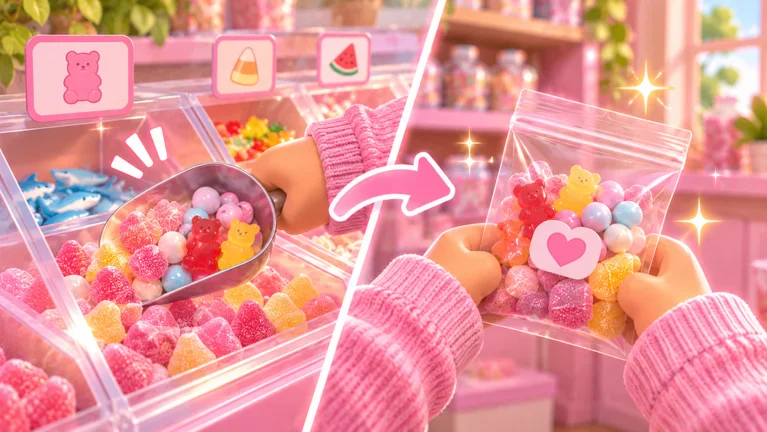
Take the named candy from its shelf and scoop it into the work package until the displayed amount matches the requested weight. Select a suitable box or bag, checking its displayed size before continuing. Add the required presentation sticker, such as shop, star, or special, then close and seal the package so it is ready for Delivery.

  • Choose packaging that can hold the order.
  • Add the required sticker before sealing.
  • Recheck the amount before closing the package.
4

Deliver and Plan Ahead

Use Delivery to send the completed package, then confirm that the order leaves the work queue and your Level or available money advances. Check remaining Stock and Gifts afterward, claim available rewards, and reorder products that are running low. Prioritize capacity or useful shop features when a real bottleneck appears, while treating decoration and later facilities as progression targets.

  • Confirm Delivery completed the transaction.
  • Claim Gifts and daily rewards between shipments.
  • Spend upgrades on current capacity bottlenecks.
Codes tracker

My Candy Business Codes

Latest collection
Current Status

No Codes Released Yet

My Candy Business has not started a code campaign yet. The developer has not published redeemable codes so far, and this page becomes the first place they appear the moment that changes.

Official Sources

Where Codes Will Drop

Future codes arrive through official channels: the My Candy Business Roblox game page and developer community posts. Check back after every major update and event.

Step By Step

How To Redeem Codes

Once codes go live, open My Candy Business, find the codes button in the game menu, type the code exactly as shown, and your reward lands on your account instantly.

Orders

My Candy Business Orders

RecordRoleAction
Printed OrderCandy and weightKeep slip visible
Order NotificationNew customer requestInspect order area
150 g Order150 g targetMeasure requested candy
250 g Order250 g targetMeasure requested candy
500 g Order500 g targetMeasure requested candy
750 g Order750 g targetMeasure requested candy
1 kg Order1 kg targetMeasure requested candy
Rush OrderTime-sensitive requestPrioritize when possible
VIP OrderVIP customer requestFollow slip carefully
Friend-boosted OrdersHigher order activityPrepare extra capacity
Packaging

My Candy Business Packaging

ElementRoleActionCondition
ScoopingMeasures candyAdd matching candyCandy in Stock
BoxHolds ordersChoose and closeSuitable quantity
BagHolds candySelect and loadOrder supports it
SizeMatches capacityCompare offered sizesFit current order
StickersLabels packagesChoose required stickerMay require multiple
ClosingSeals packageClose or sealComplete before delivery
DeliverySends parcelMove and sendPackage fully complete
Candy Orders

My Candy Business Candy Orders

CheckActionPrevents
Candy nameSelect matching shelfWrong product
Target weightMatch displayed amountIncorrect package weight
Available stockRestock low shelvesMid-order stockouts
Package choiceChoose suitable containerUnusable package
PresentationApply required stickerUnfinished package
Delivery stateClose and sendUnsent order delivery
Progression

My Candy Business Progression

1

Establish the basic order chain

Claim the Starter Shop, inspect its machines, counters, storage, level, and cash, then print the next order. Produce the requested candy and place it where the counter can sell it. Move the order through packaging and shipping, watching each handoff closely. Your first goal is a complete, repeatable chain before purchasing decoration or higher-tier candy.

  • Check every order stage before spending cash.
  • Keep candy available for the selling counter.
  • Identify where the next order stops.
2

Reinvest in the current bottleneck

Collect cash and experience from completed sales, then observe the next queue rather than buying a cosmetic upgrade immediately. Add machines or counters when production and selling lack stock. Increase inventory or packing capacity when finished work accumulates. Choose the Warehouse for storage or dispatch congestion, and avoid expanding a room that does not remove the present delay.

  • Match each purchase to the blocked stage.
  • Avoid oversized production that leaves candy unsold.
  • Use congestion as the upgrade signal.
3

Add automation after stability

Repeat the order flow until the shop can produce, sell, package, and ship reliably. When manual restocking, selling, or shipping consumes most of your session, unlock and hire Helpers if available. Automation should support a functioning chain rather than compensate for missing candy, counter space, storage, or shippable orders. Confirm that completed orders still move before expanding further.

  • Hire Helpers only after the chain functions.
  • Check that automation improves manual throughput.
  • Fix shortages before adding more assistance.
4

Follow milestones and expand carefully

Use the live unlock panel as the authority for room requirements, prices, and changing gates. Inspect Content Studio at Level 5, check for the separate Package Room around Level 10, and review Level 15 and Level 20 prompts for later content. Choose Candy Factory for production shortages, Warehouse for overflow, and delay Premium Candy or decoration until the basic chain remains stable.

  • Verify exact requirements in the current game panel.
  • Choose rooms according to the active bottleneck.
  • Keep Premium Candy behind stable automation.
Upgrades

My Candy Business Upgrade Guide

Shop growth

Shop Upgrades

Shop upgrades expand operating space and may add facilities, helping cramped businesses handle orders while requiring enough money or level progression.

  • Prioritize expansion when operating space causes delays.
  • Check the live panel for current requirements.
  • Continue supplying candy after expanding the shop.
Candy storage

Candy Capacity

Candy capacity improvements provide more room for prepared or displayed candy, reducing restocking interruptions without confirming exact storage values or production increases.

  • Choose capacity improvements when prepared candy runs out.
  • Treat storage effects as practical, not guaranteed multipliers.
  • Keep ordering, unpacking, and placing candy afterward.
Room progression

Bedroom Upgrade

Bedroom upgrades improve separate room progression, while Decorations independently handle furniture, beds, decoration packs, and other appearance-focused room items.

  • Check displayed level requirements for locked options.
  • Do not substitute decorations for progression upgrades.
  • Expect some Bedroom options to remain unavailable.
Level gate

Content Studio

Content Studio is explicitly shown as requiring Level 5, making that level a checkpoint for inspecting its current cost and purchase state after reaching the requirement.

  • Reach Level 5 before checking Content Studio.
  • Verify its live price and purchase status.
  • Do not infer income effects from level alone.
Advanced facilities

Candy Factory Warehouse Helpers

Candy Factory, Warehouse, and Helpers support later business expansion, storage, and automation, but their exact unlocks, costs, tiers, and effects remain unconfirmed.

  • Inspect each facility's displayed requirement and purchase prompt.
  • Helpers can bag, pack, and ship while away.
  • Avoid assuming a complete advanced facility order.
Upgrade planning

Funding And Priorities

Fund upgrades by completing Candy Orders accurately, maintaining stock, and using available gifts while reserving enough money for continued orders and restocking.

  • Keep enough candy available for incoming orders.
  • Complete orders accurately to earn money and progression.
  • Address the biggest current space or supply bottleneck.
Live values

Upgrade Limits

Prices, capacities, multipliers, and unlock orders lack a complete static table, so the current upgrade panel remains authoritative for each server and version.

  • Read current prices directly from upgrade panels.
  • Check displayed requirements when options appear locked.
  • Trust live prompts over older remembered values.
Decorations

My Candy Business Decorations

Store Style

Candy Store Customization

Customize shop colours, curtains, Logos, and Bag designs through the current interface, treating each choice as presentation rather than guaranteed income improvement.

  • Check currently available colours before choosing one.
  • Verify curtain prices directly in the shop.
  • Treat Branding as visual customization only.
Bedroom Décor

Bedroom Furniture

The Bedroom supports furniture and appearance choices after unlocking or upgrading, while additional items may remain locked until further Levels are gained.

  • Open the Bedroom decoration view after unlocking.
  • Check locked furniture after relevant progression upgrades.
  • Use the live panel for exact requirements.
Room Upgrades

Functional Rooms

Content Studio, Candy Factory, and Warehouse belong to the broader room system, supporting branding, production, storage, and shipping instead of simple decoration.

  • Separate functional upgrades from appearance choices.
  • Fix production bottlenecks before buying optional décor.
  • Compare each upgrade with current operating needs.
Spending Order

Cash Priorities

Decorations compete with stock, Helpers, and business upgrades, so resolve production, storage, shipping, or manual delivery limits before spending on appearance.

  • Handle delayed orders before decorating rooms.
  • Hire Helpers when manual work limits progress.
  • Keep Cash available for operating upgrades.
Clear Layout

Working Space

Arrange decorative pieces around active routes and interactions, keeping bagging, packing, shipping, and functional room workflows accessible after every placement.

  • Leave clear paths around working areas.
  • Move furniture if interactions become difficult.
  • Test helpers after rearranging room decorations.

My Candy Business FAQ

Get quick answers about running the shop, fulfilling orders, unlocking upgrades, and checking current rewards.

What do you do in My Candy Business?

You run a Roblox candy shop by ordering stock, placing candy on shelves, preparing customer orders, packaging them, and sending them for delivery. Completing orders helps you earn money and advance your shop.

How should a new player start?

Begin by ordering candy stock, opening the shipment when it arrives, and putting the products in your shop. Then follow the customer orders and prepare the requested candy and quantity before expanding the store.

How do you complete a candy order?

Check the requested candy and weight, scoop the correct amount into a suitable box or bag, add the required sticker, close the package, and send it for delivery. Common order quantities include 150 g, 250 g, 500 g, 750 g, and 1 kg.

What unlocks new content?

Fulfilling orders advances your level, and higher levels unlock additional candies, packages, rooms, decorations, and shop features. The summary identifies milestone examples at levels 5, 10, 15, and 20.

Can you upgrade and customize the shop?

Yes. Shop upgrades can increase candy capacity and add facilities or features, while the bedroom and store can be personalized with decorations such as packs, beds, and other items when their progression requirements are met.

Are there currently any My Candy Business codes?

The supplied current code record contains no codes, new codes, or source entries, so there are no evidence-backed active codes to list right now. You can still check the code topic for future status changes and redemption help.